
1:1 Student Support · Code Review · Thinkful
Technical Expert —
Chegg Skills (Thinkful)
Conducted one-on-one technical support sessions for career-changing students in Thinkful's Engineering Immersion prep program — reviewing HTML/CSS portfolio submissions, providing graded feedback, and live-coaching JavaScript coding challenges on Qualified.io.
The Role
One-on-one support at the hardest moment
Thinkful — acquired by Chegg — offered intensive bootcamp-style programs for adults changing careers into software engineering. As a Technical Expert, I supported students enrolled in the Prep Course for Engineering Immersion, meeting one-on-one via Zoom to review their project submissions and troubleshoot technical challenges in real time.
The prep phase is where many career-changers hit their first real wall — concepts like the box model, GitHub, and web deployment feel abstract until you're actually debugging a broken layout at 11pm. My job was to be the expert on the other side of that moment.
Sessions involved reviewing student-submitted GitHub repositories, walking through live code in the browser, writing structured graded feedback, and helping students understand not just what was wrong but why — so they could apply that thinking independently going forward.
1:1
live student sessions
Chegg Skills (Thinkful)
Technical Expert
Engineering Immersion Prep
The Work
What Technical Expert sessions looked like
A consistent cycle of review, feedback, and guided problem-solving across HTML, CSS, and web development fundamentals.
GitHub Repository Review
Opened each student's submitted GitHub repo, reviewed their code structure and commit history, and pulled up the live deployed site to evaluate against project requirements.
Graded Written Feedback
Provided structured written evaluations through the Thinkful platform — assessing whether projects met technical and content requirements, and adding specific, actionable improvement notes.
Live Zoom Walkthroughs
Shared screens with students to walk through their submissions in real time — showing exactly where and why something wasn't working, and demonstrating how to approach fixing it.
HTML & CSS Fundamentals
Covered the core technical content of the prep curriculum: semantic HTML, CSS basics, the box model, web page templates, links and paths, and GitHub as a deployment tool.
Portfolio Project Review
Evaluated portfolio web pages for technical accuracy, layout quality, and requirement completion — guiding students through revision cycles until their work met the bar for the full program.
JavaScript Assessment Coaching
Guided students through live JavaScript coding challenges on Qualified.io — working through logic problems like array iteration, conditionals, and object property access in real time while the student drove the keyboard.
Revision Guidance
When students submitted work that didn't yet meet requirements, helped them understand the gaps and create a clear plan for revision — turning failure into a learning moment rather than a discouragement.
In a Session
Reviewing a portfolio submission
A typical session began by opening the student's submitted GitHub repository alongside the live deployed site — reviewing the code and the rendered output simultaneously, the same way a developer would approach a code review at work.
Feedback was both written and verbal. The structured written evaluation — submitted through the Thinkful platform — gave students a permanent reference. The live Zoom session made the feedback immediate and personal, turning abstract comments into concrete, visible changes.
The feedback above is from an actual session: a student who put in genuine effort on their portfolio, met requirements, but needed guidance on systematic self-review — a skill as important as any technical concept in the curriculum.
Thinkful Platform — Grader Feedback
Evaluate whether the student met the technical and content requirements for this project.
"Dear Joshua, you have put in a great effort to work on this project. Met all the technical and content requirements for this project."
Additional Feedback
"Prior to submitting, consider going through your app a few times. With each pass, try focusing on a specific requirement, verifying that it is met. This is a common practice amongst developers."
Session Walkthrough
How a 1:1 actually unfolds
The March 7 session is a good example of how unpredictable 1:1 support work actually is. Joshua came in needing help with Git — a foundational tool the curriculum assumed was already set up. It wasn't. Before any code review or assessment coaching could happen, the environment had to exist.
That's not a detour. That's the session. Getting the tooling right — git config, GitHub account, a cloned repository, a mental model of the terminal — is what makes everything else in the curriculum possible. Skipping it doesn't make a student more ready; it just defers the confusion.
The Chrome DevTools moment at the start was small but intentional. Switching to dark theme isn't a technical requirement — but taking a minute to show Joshua where the settings panel lives, and what else is configurable there, reinforced that DevTools is a workspace, not just a console. That framing pays off later.
By the end of the session Joshua had a working Git setup, a cloned repository on his machine, and enough terminal fluency to navigate to it. From there, the actual project work could begin.
Check In
Ask where Joshua is · what he's working on · what's blocking him
Chrome DevTools
Switch DevTools to dark theme together · surface the settings panel for future reference
Git Config
Set git config --global user.name and user.email · explain why it matters for commit attribution
GitHub Config
Confirm the existing GitHub account · run git config --global user.name and user.email · verify with git config --list
git clone
Clone a repository · walk through what the command does and where files land locally
Terminal Navigation
pwd · ls · cd — give Joshua a mental map of the filesystem so he can find his cloned files
Session Recording
Watch the Walkthrough
Git setup and DevTools walkthrough — a recorded 1:1 Technical Expert session from the Thinkful Engineering Immersion Prep program.

JavaScript Assessment
Live coding on Qualified.io
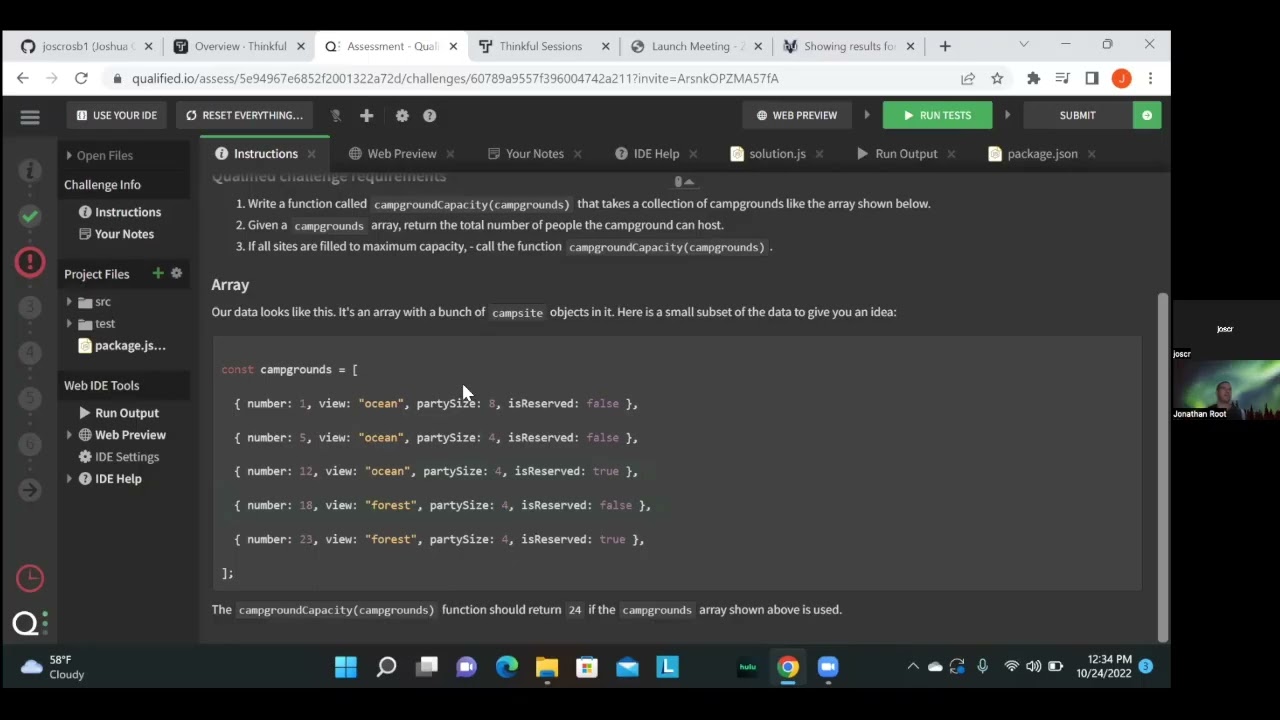
The second half of each session often shifted into JavaScript — working through coding challenges on Qualified.io, a browser-based assessment platform used by Thinkful to evaluate students' readiness for the full engineering program.
In the session recorded here, the student was working through a campsiteCount challenge: iterate through an array of campground objects and sum the partySize for any campground where isReserved is true.
The student had the loop structure right but hadn't yet connected the conditional. My role was to ask the right questions — "what property tells you whether a site is reserved?" — rather than just typing the answer, so the student arrived at the solution through their own reasoning.
solution.js — Qualified.io Assessment
function campsiteCount(campgrounds) {
let sum = 0
for (let i = 0; i < campgrounds.length; i++) {
if (campgrounds[i].isReserved) {
sum += campgrounds[i].partySize
}
}
return sum
}
Session Recording
See a Live Session
A recorded one-on-one Technical Expert session reviewing an HTML & CSS portfolio submission on the Thinkful platform, October 2022.
More Sessions
More from the Role
A growing collection of recorded 1:1 sessions — technical walkthroughs, coaching conversations, and live problem-solving from the Thinkful Engineering Immersion Prep program.
Reflection
Feedback as a teaching tool
The Technical Expert role refined something I'd been developing across years of bootcamp and online instruction: the ability to write feedback that teaches, not just evaluates.
Good feedback tells a student what to fix. Great feedback explains the principle behind the fix — so the next time they encounter a similar problem, they have a framework for solving it themselves. That's what I tried to deliver in every written evaluation and every live session.
It's the same principle that drives good instructional design: the goal isn't to answer the question in front of you, it's to build the learner's capacity to answer the next one on their own.
Technical Expert, Chegg Skills (Thinkful), 2022.
2022
Chegg Skills (Thinkful)
Technical Expert
1:1 Student Sessions · Code Review
Engineering Immersion Prep
Interested in working together?
I'm currently available for remote instructional design and eLearning development contracts.