
Live Instruction · JavaScript · Problem Solving · Masterschool
JavaScript Brain Teasers —
Catchup Week Open Gym
A live open gym session during a catchup week covering JavaScript prototypes in response to a student question, then working through two interview-style brain teasers live: a vowel frequency counter and a total uppercase letter counter, with full student participation throughout.
The Session
Student questions first, then brain teasers
Catchup weeks exist for a reason — students move through a bootcamp curriculum at different speeds, and a structured pause gives everyone a chance to consolidate what they've learned before moving forward. This session ran as a true open gym: no new material pushed, just space for questions, project help, and practice.
The session opened with a student question about JavaScript prototypes — something that had come up in a previous session without landing clearly. Rather than redirecting to the curriculum, I walked through it live, using the browser console to show the console object itself and how methods like .log are just functions on that prototype. That kind of organic Q&A often produces cleaner explanations than planned content.
With no other project questions coming in, I moved into two interview-style brain teasers — a vowel frequency counter and a total uppercase letter counter — both built live with student input. The problems were chosen to put JavaScript basics together in one place: functions, loops, objects, strings, and conditionals, without introducing anything new.
2
interview-style brain teasers
Masterschool Coding Bootcamp
JavaScript · Problem Solving · Udacity Curriculum
International cohort · Catchup week format
The Content
What the session covered
Prototypes, two brain teasers, and interview prep framing — all built live with student participation.
JavaScript Prototypes
Explained how JavaScript's underlying API is built on prototypes — that strings, arrays, and functions are all objects at their core, each with built-in properties and methods. Connected the concept to why dot notation works: you're accessing properties on that object's prototype.
Properties vs Methods
Clarified the distinction between a property (a value stored on an object, like .length) and a method (a function stored on an object, like .push or .log). Demonstrated live by typing console into the browser console and inspecting the returned object.
Vowel Frequency Counter — Setup
Introduced the first brain teaser: given a string like "hello", return a formatted string showing how many times each vowel appears. Walked through the function shell with students — naming the parameter, setting up the call, and identifying what the function needs to return.
Object as a Counter
Built an empty object to track vowel frequency — demonstrating the pattern of using an object's keys as variable names and its values as counts. Showed how to check if a key already exists in the object and either initialize it to 1 or increment it.
Nested Loops and String Comparison
Used an outer loop to move through each character in the input string and an inner loop to check it against each vowel in a reference string — building the logic piece by piece with student suggestions at each step. Traced the execution for the word "hello" live.
Total Caps — toLowerCase Detection
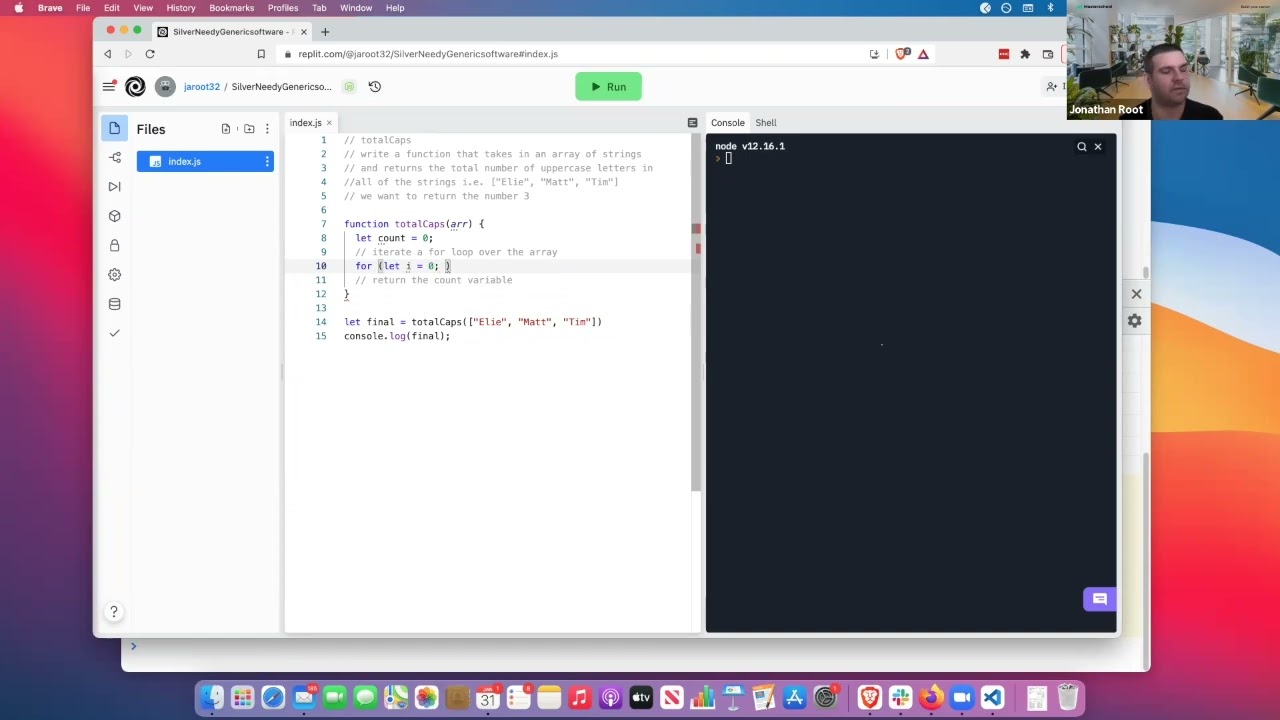
Introduced the second brain teaser: count total uppercase letters across an array of strings. Key technique: arr[i][j].toLowerCase() !== arr[i][j] — if converting a character to lowercase changes it, the original must have been uppercase. Nested loops with a running count.
Building Output with Template Literals
After building the vowel frequency object, used a for...in loop to format the result — iterating over each key, using template literals with += to build the output string incrementally. Demonstrated the pattern of starting with an empty string and accumulating into it.
Interview Prep Framing
Framed both problems the way a technical interview would — asking clarifying questions before writing code (is the input always lowercase?), presenting a working solution first, and then discussing how to make it more efficient. Mentioned refactoring with forEach and map as a next step.
Pair Programming Introduction
Closed with a note on pair programming — explaining the driver/navigator model and pointing out that the session had already followed that format, with students suggesting code in chat while I drove. Mentioned bringing activities to future open gyms as a shared responsibility.
The Approach
Student-driven agenda with prepared backup
Catchup weeks are easy to let slide into unstructured time. The approach here was to hold space for genuine student questions first — sharing screen, asking in chat, unmuting — and only move to prepared content if nothing came up. When the prototype question surfaced, that became the session opener. It was a better explanation than anything I had planned because the student had a specific gap that needed addressing.
The two brain teasers were chosen deliberately — not as new material, but as integration problems. Both problems required the same set of tools students had already seen: functions, loops, objects, strings, and conditionals. The goal wasn't to teach anything new but to put what they already knew into a context that felt like a real problem.
The interview framing around both problems — ask clarifying questions before you write code, get to a working solution, then talk about how to improve it — is something students rarely get exposure to before they need it. Embedding that framing into an open gym problem is lower stakes than a mock interview but starts building the habit.
One student suggested using ASCII codes to detect uppercase letters — an approach that works and shows real depth of thinking. Acknowledging that kind of contribution publicly, and connecting it to how the sort function likely works under the hood, rewards the kind of curiosity that makes strong developers.
Open Floor First
Project questions · any concepts still unclear
Prototype Deep Dive
Student question · live browser console demo
Brain Teaser 1
Vowel Frequency Counter · full live build
Brain Teaser 2
Total Caps · nested loops · toLowerCase technique
Interview Framing
Clarify inputs · working solution · optimize
Session Recording
Watch the Session
Live catchup week open gym covering JavaScript prototypes and two interview-style brain teasers.
Reflection
Integration problems over isolated drills
The most useful thing about these brain teasers is that they don't introduce anything new — they require students to combine what they already know. That's a different cognitive demand than learning a new concept, and it's closer to what real development actually looks like. Most problems on the job aren't about knowing an obscure API; they're about assembling familiar tools in the right sequence.
The prototype explanation that opened the session is a good example of why organic Q&A produces better teaching moments than prepared content. The student had a specific gap — they'd heard the word but didn't have a mental model for it. Showing the console object in the browser, pointing at the methods listed there, and saying "these are all just functions on the prototype" gave the concept somewhere concrete to land.
5
concepts · two problems
Functions · Loops · Objects · Strings · Conditionals
Vowel frequency · uppercase detection
Interview framing · clarify · solve · optimize
Interested in working together?
I'm currently available for remote instructional design and eLearning development contracts.