
Live Instruction · JavaScript · OOP · Masterschool
Dinosaur Infographic —
Live Debugging and OOP Walkthrough
A small-group support session for Masterschool students blocked on the Udacity Dinosaur Infographic project — working through two methods for loading JSON data, building the Dino constructor live, implementing the IIFE pattern for form handling, and debugging with the Chrome debugger as students watched in real time.
The Session
Show your screen and we'll get you unblocked
This session was specifically for students who hadn't yet passed the Udacity Dinosaur Infographic project — a JavaScript OOP assignment requiring constructor functions, JSON data loading, DOM manipulation, form handling, and comparison logic. Students who had already passed were welcome to stay and help. Julia did exactly that.
Rather than delivering new content, the format was simple: share your screen, show where you're blocked, and work through it together. Abdullah was blocked on loading the JSON file into the app. Vijay hadn't started yet but had a specific question about how importing objects worked. The session adapted in real time to what was actually in front of students.
From there the session moved into a live walkthrough — building out the Dino constructor, the HTML rendering function, the IIFE for form data, and the comparison logic — with the Chrome debugger open when things didn't work as expected. Getting stuck and unstuck live was part of the point.
2
methods to load JSON data
Masterschool Coding Bootcamp
JavaScript · OOP · Udacity Curriculum
International cohort · Small group · Office hours format
Object-Oriented JavaScript
The conceptual layer before the project
Before debugging the assignment, students needed a shared mental model for how JavaScript handles objects and inheritance — which is different from every class-based language they may have encountered before.
Prototypal vs. Classical Inheritance
JavaScript does not use class-based inheritance like Java or C++. It uses prototypal inheritance — objects link directly to other objects through a prototype chain, rather than inheriting from a class blueprint. ES6 class syntax is syntactical sugar over this same mechanism, not a replacement for it.
The Prototype Chain
Every JavaScript object has a private link to another object called its prototype. That prototype has its own prototype, and so on — until an object with a null prototype is reached. When the engine looks up a property or method, it walks this chain until it finds it or reaches the end.
Inheritance, Simply Put
Inheritance means one object gets access to the properties and methods of another. In JavaScript, this happens automatically through the prototype chain — no explicit copying of properties required. The engine checks the chain at lookup time, not at creation time.
Object Literals
The simplest way to create an object: use curly braces {}. Useful for one-off data structures and config objects. Doesn't support reuse through prototypal inheritance without Object.create().
Constructor Functions and ES6 Classes
Constructor functions use the new keyword to create object instances, and .prototype to add shared methods. ES6 class syntax does the same thing with cleaner grammar — which is why it's called syntactical sugar. React uses this syntax for class components.
Object.create() for Prototypal Inheritance
Object.create() lets you set the prototype of a new object explicitly — the most direct expression of prototypal inheritance in JavaScript. Useful when you want an object to inherit from another without the constructor function pattern.
The Content
What the session covered
From JSON loading to comparison logic — built live with students watching, with real debugging moments throughout.
Two Methods to Load JSON
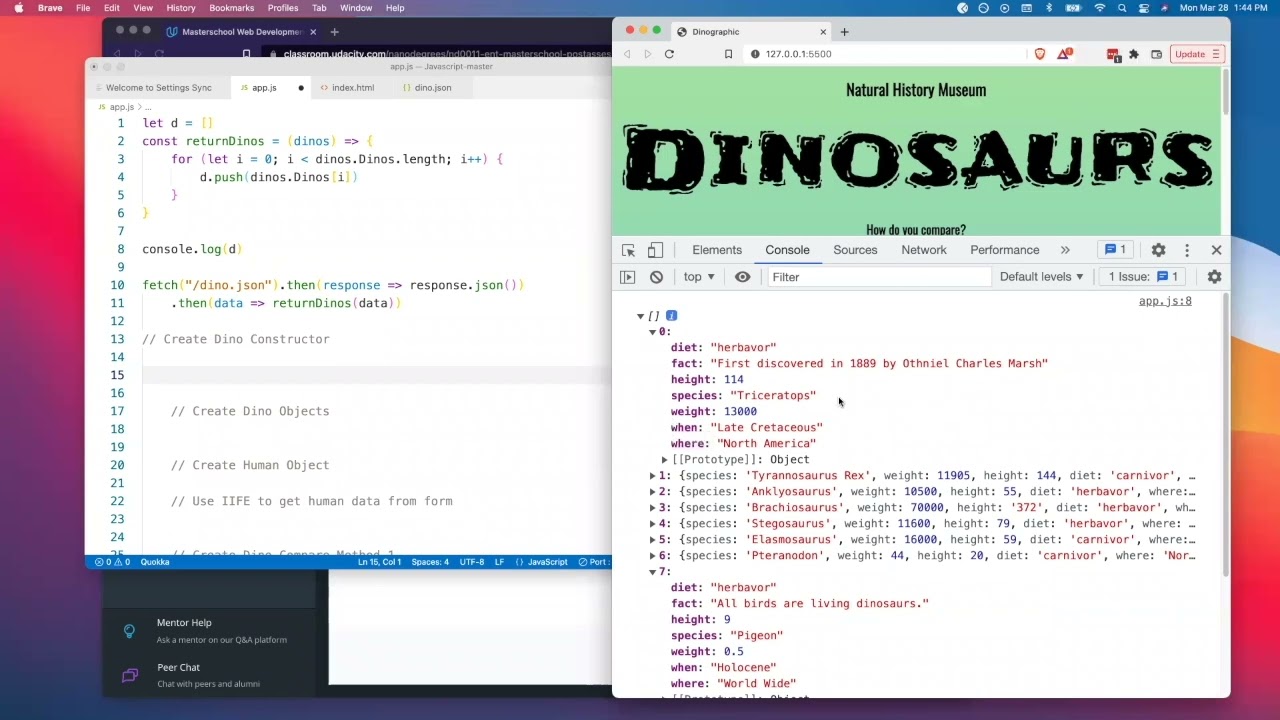
Demonstrated both approaches: the import method (convert .json to .js, assign to a variable, export default, import in app.js, add type="module" to the script tag) and the fetch method (fetch the file, chain .then(res => res.json()), then pass the data where needed). Showed each resolving in the console.
Dino Constructor Function
Built the Dino constructor live — taking a destructured object with diet, fact, height, species, weight, when, and where — and using the this keyword to assign each property. Confirmed that the constructor can also be written as a class, which one student asked about.
Image Method and .toLowerCase()
Added an img() method to the constructor that builds the image path using this.species.toLowerCase() + '.png' — because the species names in the JSON are uppercase (Triceratops) but the image filenames are lowercase (triceratops.png). The mismatch would silently break the image source without this step.
Render Method with Template Literals
Built a render() method that returns an HTML div using template literals — inserting species, height, diet, when, where, and the image source. Students contributed answers for which properties to insert at each step. Emphasized that the HTML structure and styling choices were up to each student.
htmlDinos Function and Looping
Wrote a function that takes the dinos array, loops through it, instantiates new Dino() for each object, and pushes the resulting HTML node to an output array. Hit a real bug live — the array was coming back empty — and worked through it with the Chrome debugger before finding and fixing the issue.
IIFE for Form Data
Showed the IIFE pattern as the way to grab and save references to form fields — document.getElementById() calls inside an immediately invoked function expression that returns a function, which when called returns an object with all the filled-in values. Connected it back to the module pattern and closures covered earlier in the program.
String to Number Conversion
Demonstrated that form input values always come back as strings — even when the user types a number. Showed the Number() constructor as the fix and walked through where to apply it: before doing multiplication or comparison, not after. Confirmed it live by logging the type of a grabbed form value.
Compare Object IIFE
Sketched out the comparison logic: another IIFE that returns an object exposing comparison methods (compareWeight, etc.). Each method takes the dinos array and the human object, loops through, counts how many dinosaurs the human outweighs, and returns the count — which gets added as a property on the human tile before rendering.
Chrome Debugger in Real Use
Used the Chrome debugger — not as a demo, but because the code wasn't working. Set a breakpoint inside the htmlDinos function, stepped through, and watched the empty array problem reveal itself. Closed with the reminder that getting stuck is normal and that the debugger and console.log are the actual tools professionals use.
The Approach
Screen share first, then build together
A support session structured around student blockers is a different kind of facilitation than a lecture. The goal isn't to deliver content — it's to diagnose what's actually stopping each person and find the smallest intervention that gets them moving again. Asking Abdullah to share his screen rather than describe the problem was that intervention. Seeing the code, the errors, and what he'd tried was more useful than any explanation.
The two JSON loading approaches served different students. The import method is cleaner if students are comfortable with modules. The fetch approach is more aligned with what they'd been doing all month — promises, .then chaining, async data. Showing both gave students a choice and surfaced why each one exists.
The live debugging moment with the empty array was unplanned but useful. The code looked right. The console wasn't giving a useful error. Opening the debugger and stepping through line by line was the only way to see what was actually happening — and that's a more honest picture of how debugging works than a tutorial where every example resolves cleanly on the first try.
Julia attending after already passing the project was a good signal. The session closed with a reminder that getting blocked for hours without reaching out isn't necessary — Slack, office hours, and one-on-one support are there specifically for moments like this.
Check In
Each student shares where they are · what's blocking them
Screen Share
Look at the actual code · errors · what's been tried
Live Walkthrough
Two JSON methods · Dino constructor · render · IIFE
Debug Live
Chrome debugger open · empty array issue · traced and fixed
Next Steps
Comparison logic · human tile · Slack if blocked again
Session Recording
Watch the Session
Live OOP support session — JSON loading, Dino constructor, IIFE form handling, and Chrome debugger in real use.
Reflection
Getting stuck is part of it — show that
The empty array bug was the most instructive moment in the session. The function looked right. Nothing in the console pointed directly at the problem. Opening the debugger and stepping through was the only path forward — and doing that live, with students watching, modeled something that polished tutorial videos can't: what it actually looks like to investigate code that isn't working.
The .toLowerCase() detail is a good example of the kind of gap that derails projects without generating an obvious error. The image just doesn't load. There's no red squiggly line, no exception thrown. Understanding why — that the species name in the JSON is capitalized but the filename isn't — requires reading both the data and the file system together, not just the code in front of you.
9
concepts covered in one session
OOP · Constructor Functions · IIFE
JSON loading · DOM manipulation · Debugging
Small group · Office hours · Live unblocking
Keep Exploring
More from this project
Interested in working together?
I'm currently available for remote instructional design and eLearning development contracts.