
Live Instruction · Epic React · Onboarding · Masterschool
Intro to Epic React —
Live Group Onboarding Session
A live one-hour group session orienting Masterschool bootcamp students to the Epic React workshop platform — watching Kent C. Dodds' welcome video together and completing every setup step live, so no one hits a wall before the first exercise.
The Session
Watch together, do together
Epic React is one of the most highly regarded React learning resources available — but getting set up and oriented before the first exercise requires navigating GitHub, cloning a repo, running a setup script, and understanding a workshop environment that's unlike anything most bootcamp students have seen before. That friction is real, and it doesn't have anything to do with React.
This session was designed to eliminate it. The cohort was a week away from starting the React Hooks workshop, and the goal was simple: get everyone logged in, cloned, running, and oriented — together — before they ever opened an exercise file on their own.
Rather than describing the setup process, we watched Kent C. Dodds' welcome video as a group and did every step live alongside it. That meant students weren't just passively watching — they were in their terminals, cloning repos, running scripts, and asking questions in real time while the setup was still fresh.
~60
minutes · live session
Masterschool Coding Bootcamp
Epic React · Kent C. Dodds · React Hooks
International cohort · April 2022
The Content
What the session covered
Platform orientation, live setup, and troubleshooting — everything students needed before the first exercise.
License Verification and Login
Opened by checking that every student had claimed their Epic React license and successfully logged in — catching stragglers early and walking one student through the passwordless email login flow live in the session.
Kent C. Dodds' Welcome Video
Co-watched the official Epic React welcome video as a group — pausing to troubleshoot an audio share issue, annotating key moments in real time, and connecting the platform tour to what students already knew from Udacity.
Prerequisites and Environment Check
Covered the technical prerequisites Kent outlines — Git, Node.js, NPM, React DevTools, and Chrome — connecting them to the gap week JavaScript practice the cohort had just completed.
Workshop Setup — Clone and Install
Led the group through the three-step setup process live: git clone, cd into the repo, run the setup script. Troubleshot a "destination already exists" error in real time and walked everyone through resolving it.
Exercise Workflow and App Tour
Walked through the Epic React exercise environment — the split-panel layout, isolated exercise view, final comparison tab, test runner, and the emoji guide (Cody the Koala, Marty the Money Bag) that marks exercise prompts.
React Hooks Repo Setup
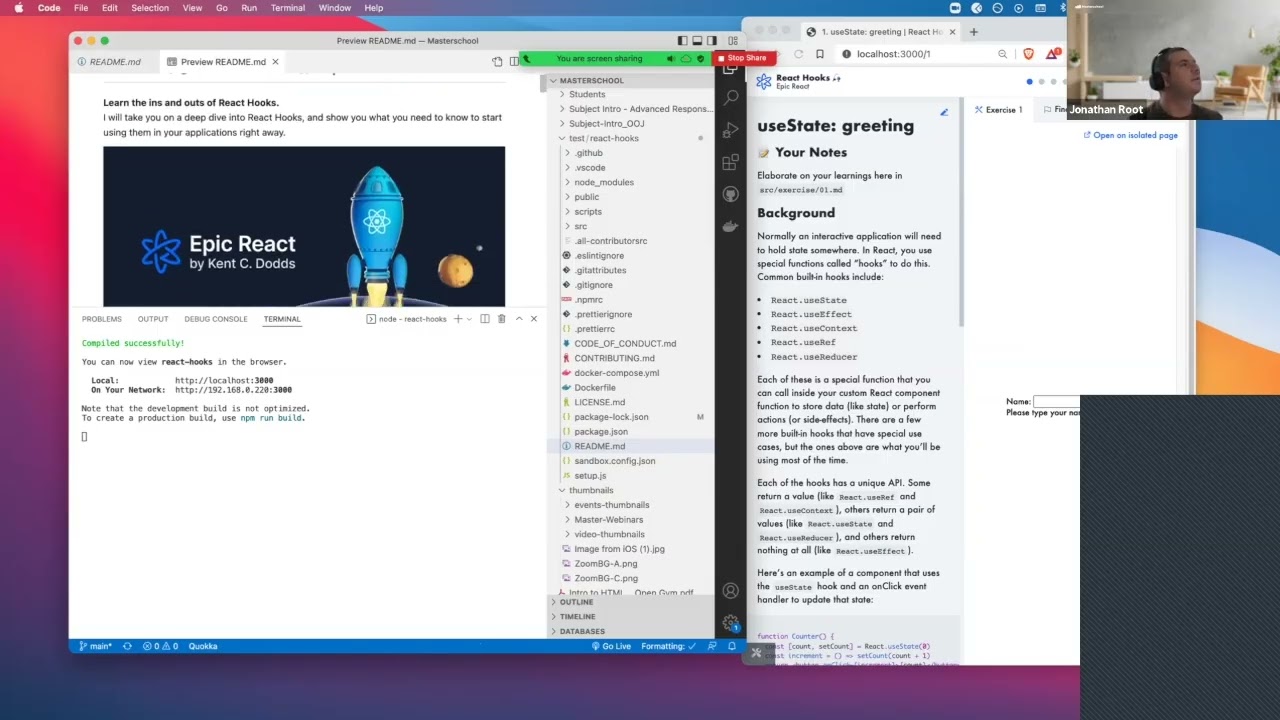
Closed the session by cloning the React Hooks workshop repo — the actual workshop starting the following week — so students left with everything installed and ready to run, not just oriented in theory.
The Approach
Co-viewing as an instructional strategy
Showing students a setup process and having them do a setup process are two different things. This session was built around the second. We watched Kent's welcome video together with the students following along in their own environments — not watching passively, but executing each step as it appeared on screen.
When the audio share broke at the start of the video, I switched from screen share to browser share mid-session without losing the thread. When a student hit a "destination already exists" error during the git clone, I worked through it live — creating a test folder and recloning — rather than deferring it to async support. Those moments of real troubleshooting in front of the group are more instructional than a smooth demo ever could be.
I also annotated the video in real time — connecting what Kent was explaining to what the cohort already knew. When Kent listed the JavaScript prerequisites, I pointed back to the gap week practice they'd just completed. When he covered the exercise file structure, I connected it to the React work they were already doing in Udacity. The welcome video became a conversation, not a presentation.
The session also connects directly to the Loom screencasts I recorded for Epic React account setup and navigation. Together they form a complete onboarding system: async screencasts for individual reference, live group session for guided first steps.
Verify First
Everyone logged in before the video starts
Watch Together
Kent's welcome video — shared screen, live commentary
Do Alongside
Every setup step executed live in the terminal
Troubleshoot Live
Errors handled in real time, not deferred
Leave Ready
React Hooks repo cloned and installed before session ends
Session Recording
Watch the Session
Edited highlights from the live Intro to Epic React onboarding session at Masterschool, April 2022.
Reflection
What onboarding actually requires
Onboarding sessions are easy to underestimate. They don't feel like instruction — there's no concept being taught, no skill being practiced. But the cost of skipping them is real: students who can't get their environment running don't struggle with React, they struggle with npm. That's a different problem, and it drains time and motivation from the actual learning.
What this session taught me is that onboarding is most effective when it's genuinely participatory. A walkthrough video accomplishes something. A live session where every student is in their terminal, hitting the same commands, seeing the same output — and occasionally hitting the same errors — accomplishes something different. The shared experience creates a reference point that async content can't replicate.
0
setup errors left unresolved
Epic React · React Hooks Workshop
git clone · npm setup · localhost:3000
International cohort · April 2022
Keep Exploring
More from this project
Interested in working together?
I'm currently available for remote instructional design and eLearning development contracts.